How to Make ChatGPT's Answers Shorter
THE ANSWER
Click your profile picture, choose Personalization, and change two things: set Base style and tone to Efficient, then type one line into Custom instructions: "Default to the shortest correct answer. Expand only when I ask." The whole change takes under a minute, and you can still ask for depth any time.
Ask ChatGPT whether a calendar invite should go out in EST or UTC and you get four bullet points, a daylight-saving lecture, and the actual answer parked at the bottom. That is not your imagination, and it is not the question's fault. The newest models over-explain by default: long, structured, over-qualified answers to simple questions. Two settings fix it. Every screen in this guide is a real capture from a live ChatGPT session on a free account.
Why ChatGPT over-explains
Models learn from human feedback. When people rate answers, the thorough-looking ones tend to win: more structure, more caveats, more everything. So the model plays it safe. It shows its work, covers every edge case, and buries your one-line answer somewhere in the middle. The fix is not a better prompt each time. It is telling ChatGPT once, in its own settings, what your default should be.
Setting one: Efficient
- Open Personalization
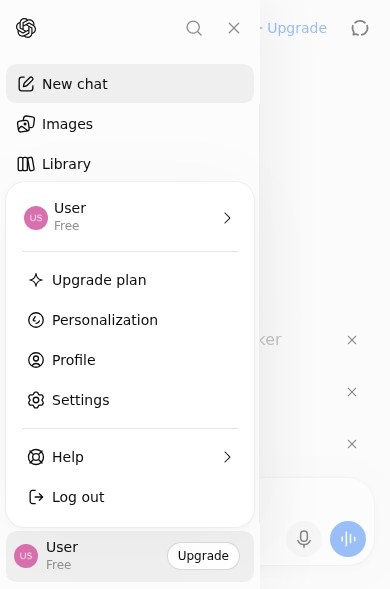
On chatgpt.com, click your profile picture and choose Personalization. The same pane also lives at Settings › Personalization.
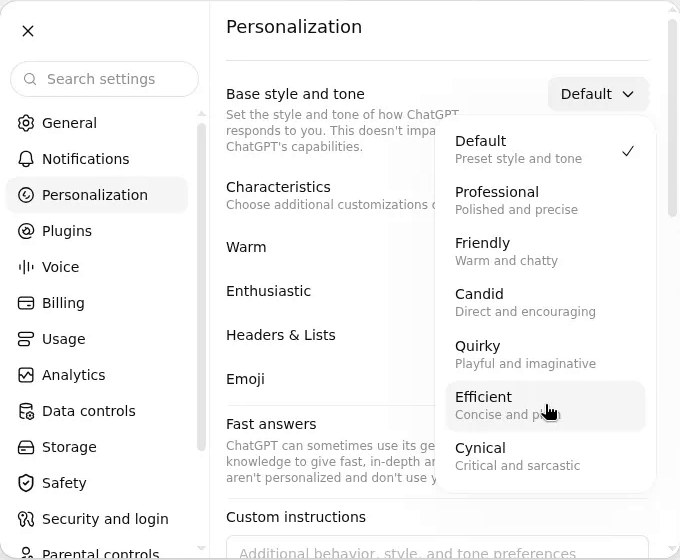
- Open Base style and tone
It is the first control on the pane, set to Default out of the box.
- Pick Efficient
Seven styles are listed. Efficient is described as "Concise and plain," and that is exactly how it reads. A toast confirms: "Base style and tone updated."
Setting two: one custom instruction
- Scroll down the same pane
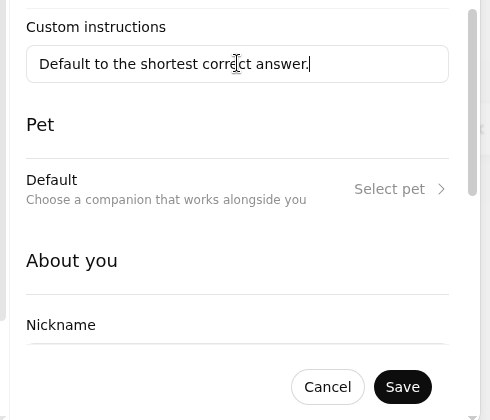
Below the style controls sits a plain text field labeled Custom instructions.
- Type the rule
Default to the shortest correct answer. Expand only when I ask. That second sentence matters: it tells the model brevity is the default, not a limit.
- Save
Cancel and Save appear as soon as you type. The rule now applies to every new chat, and paid plans give you 5,000 characters if you ever want more rules.
On your phone
Same switches, same rule. In the ChatGPT app, tap your profile picture and choose Personalization. Both controls are in the same pane there.
Which lever to pull
| Approach | What it changes | Effort | When it wins |
|---|---|---|---|
| Do nothing | Nothing: long, structured answers stay the default | None | You genuinely like the deep dives |
| Efficient style | Every answer gets noticeably tighter, in every chat | One click, once | The single biggest fix for over-explaining |
| Custom instruction | Sets your default rule in the model's standing orders | One sentence, once | Locks in "shortest correct answer" behavior |
| Ask in the prompt | Just that one reply ("one sentence," "just the command") | Every time | Formats: lists, commands, exact shapes |
| Reply "shorter" | The rest of that conversation takes the hint | One word | When it still over-delivers mid-chat |
The part everyone misses
You lose nothing. These settings set the default, not the ceiling. When you actually want the deep version, ask for it and ChatGPT delivers it at full length, custom instruction and all. The settings only decide what a simple question gets by default: a simple answer.
One warning: Efficient trims the pleasantries too. If you like the small talk, keep your current style and let the custom instruction do the work alone. The instruction shortens answers; the style also flattens the chit-chat.
STILL TOO MUCH?
Two habits finish the job. Ask for the format up front: "one sentence," "just the command," "no preamble." And when an answer still over-delivers, reply with one word: shorter. The model takes the hint for the rest of the conversation.
Simple question, simple answer. That is the whole fix.