How to Turn On Dark Mode in Windows 11
THE ANSWER
Right click any empty part of your desktop, choose Personalize, then click Colors. At the top of that page, set Choose your mode to Dark. The window changes while you are looking at it. The same page lives at Settings › Personalization › Colors.
Three clicks, and it is done. The reason people search for this at all is that the switch is not where anyone looks first. It is not in the Start menu, it is not in Quick Settings next to Wi-Fi and Bluetooth, and it is not under System. It is under Personalization, filed with wallpapers and accent colors, because Microsoft treats it as a theme rather than a display setting.
The rest of this page is the part that actually causes the follow up searches: the third option in that dropdown that almost nobody uses, and why half of Windows stays blazing white after you flip the switch.
Turn it on: the three clicks
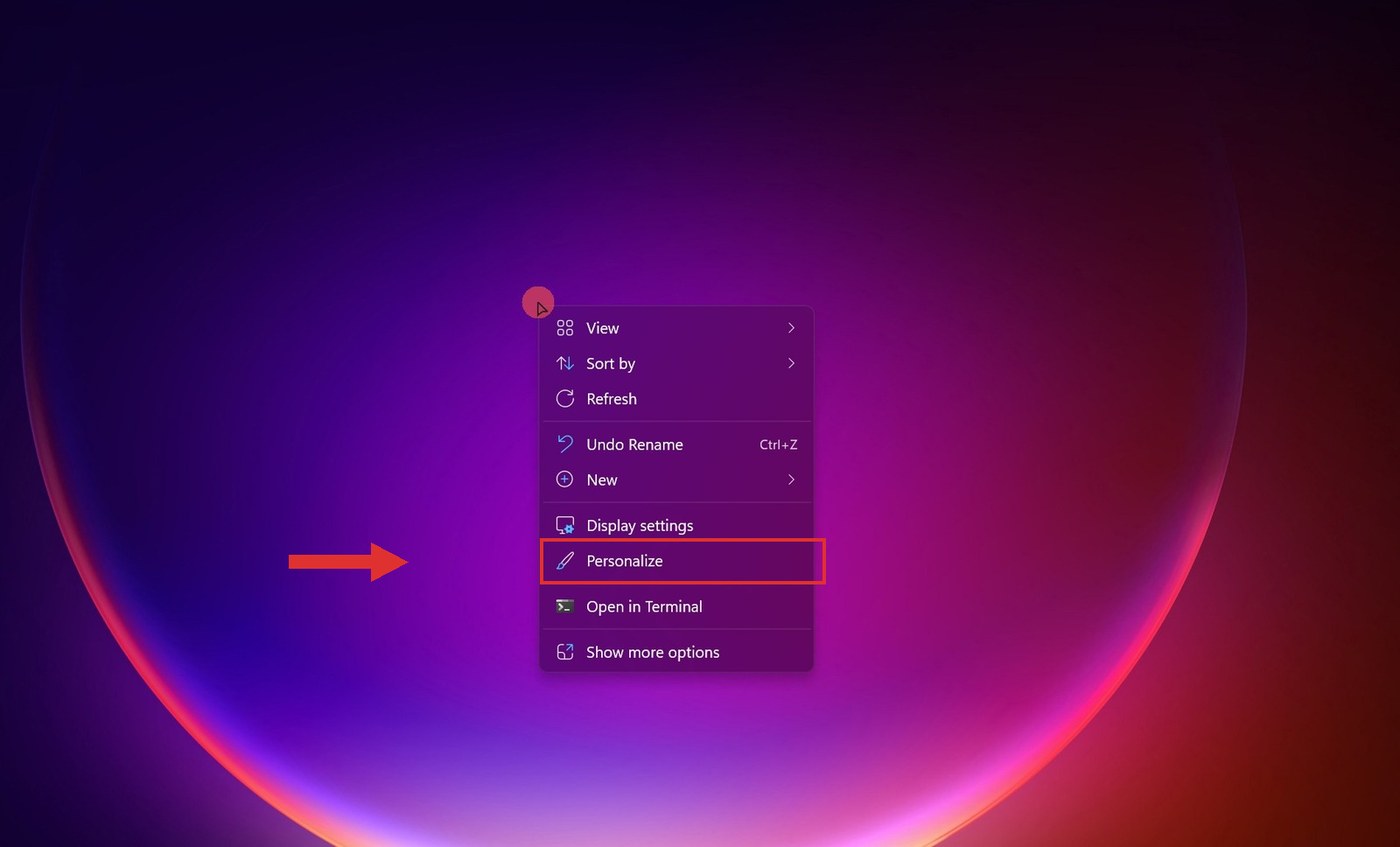
- Right click your desktop and choose Personalize
This is the fast route. It skips the Start menu entirely and drops you straight onto the Personalization page in Settings.
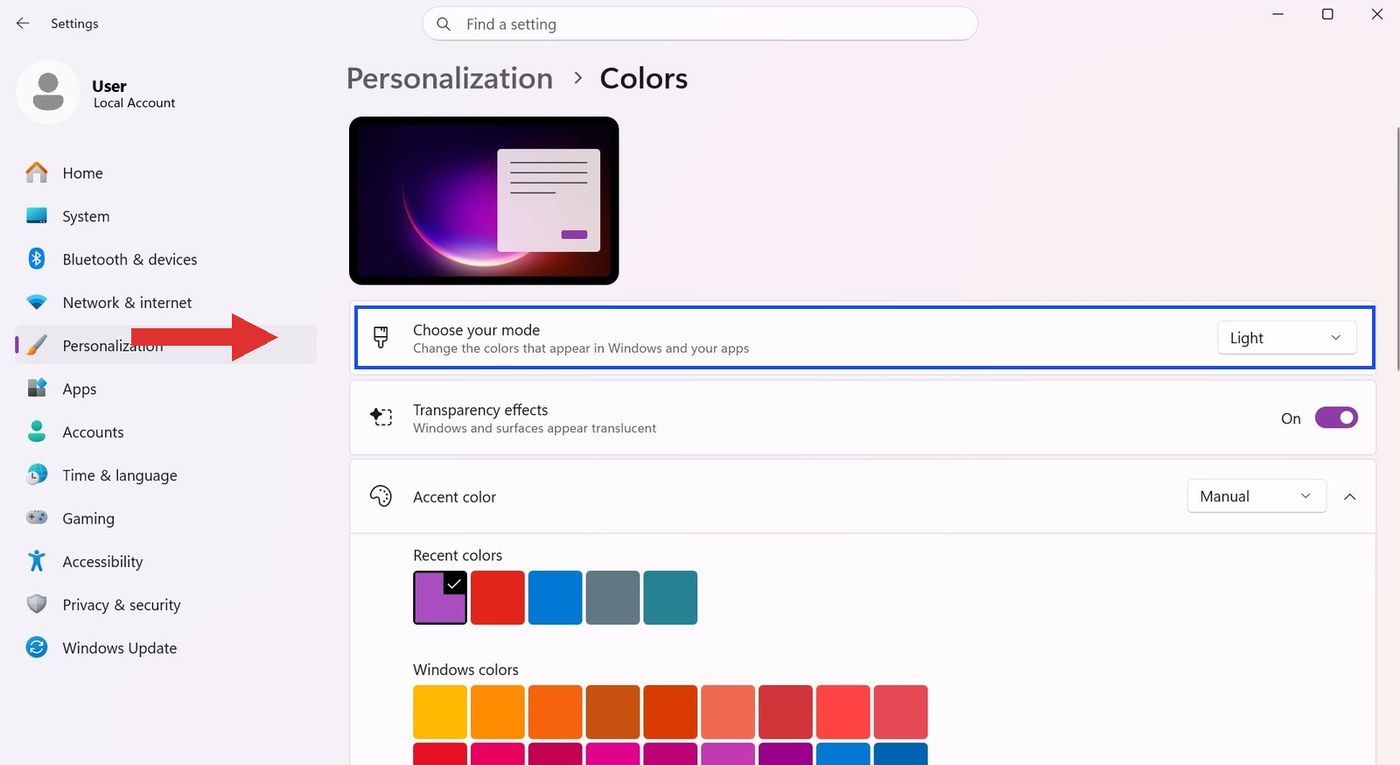
- Click Colors
It is the row under Background. If you would rather navigate the long way, it is Settings › Personalization › Colors.
- Set Choose your mode to Dark
The dropdown sits at the very top of the page. Pick Dark and the Settings window itself flips while you watch. That is the whole setting.
There are three options, not two
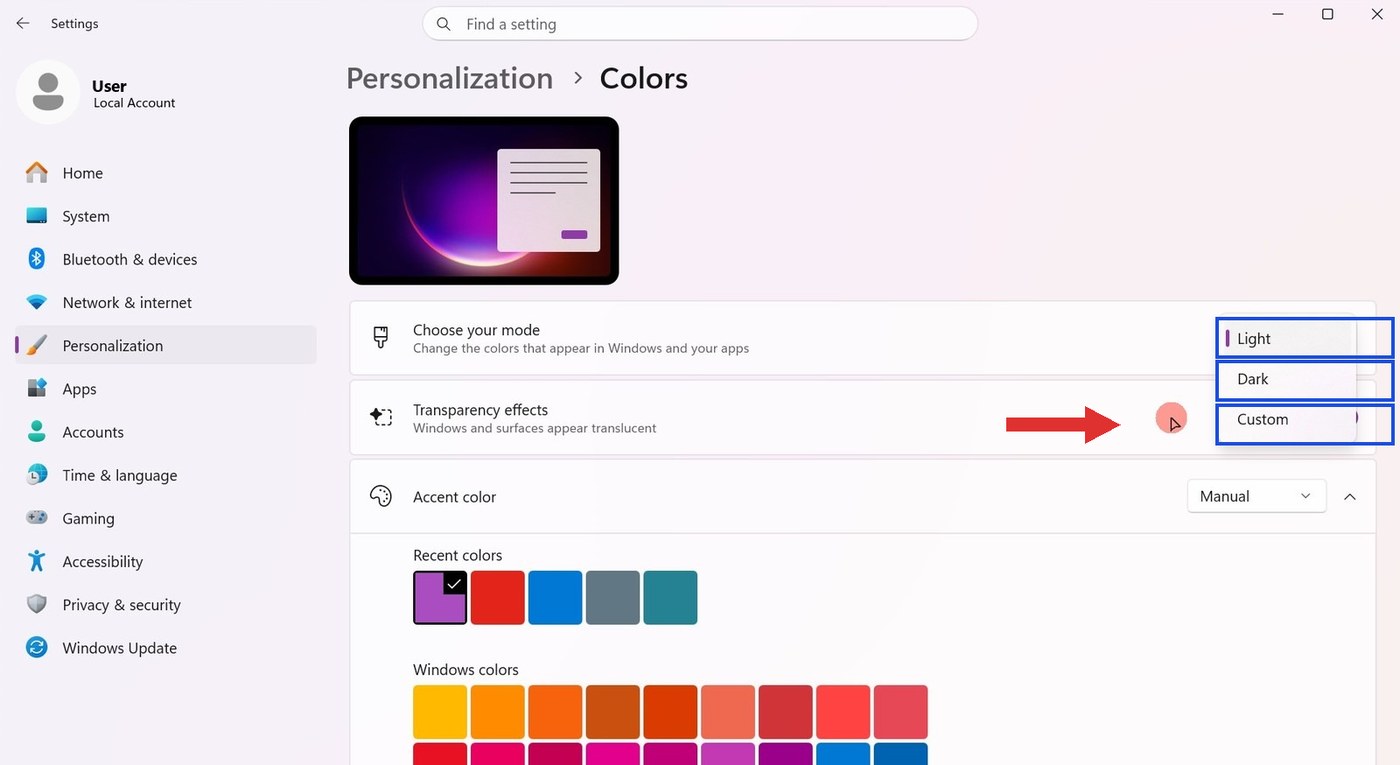
Open that dropdown and you get Light, Dark and Custom. Custom is the one almost nobody picks, and it is the most useful of the three.
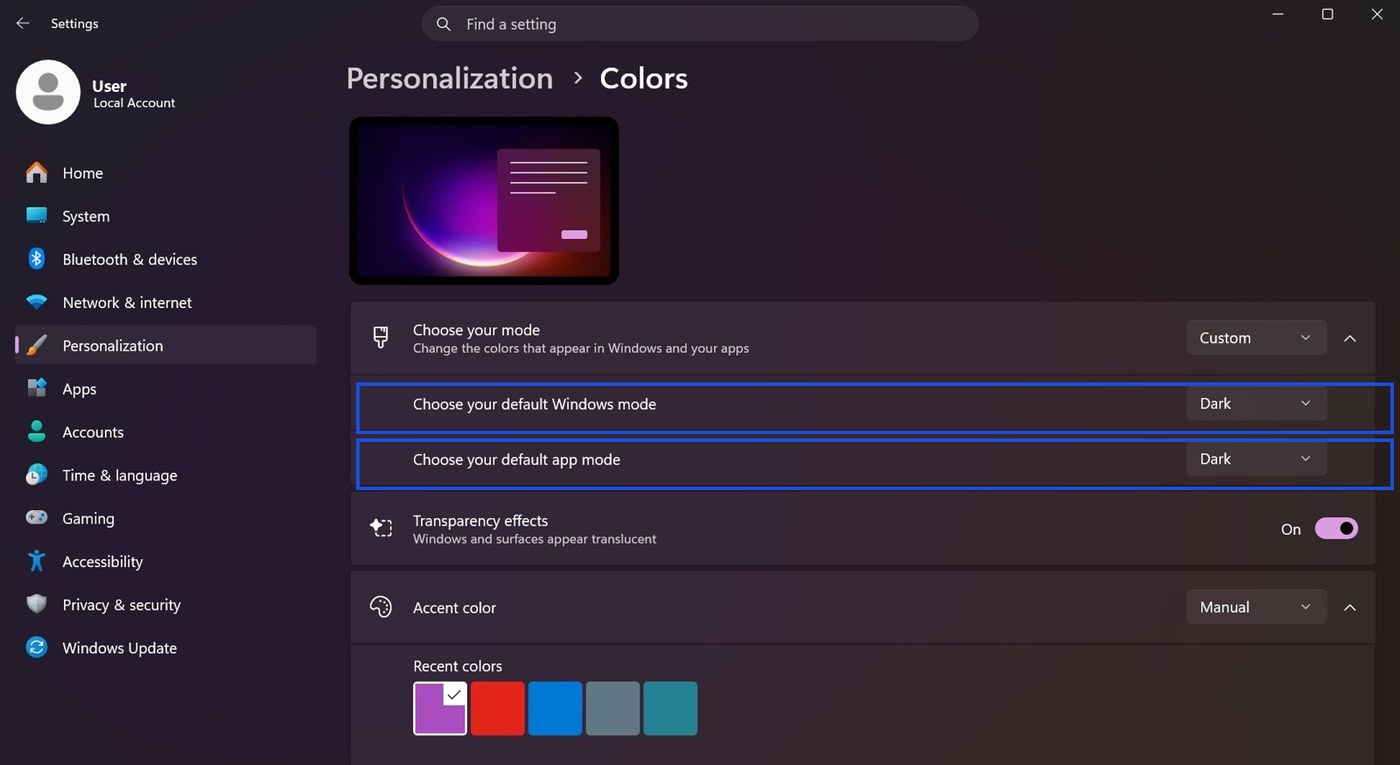
Choose Custom and the single setting splits into two separate dropdowns. Choose your default Windows mode controls the shell: your taskbar, the Start menu and the notification center. Choose your default app mode controls Settings, File Explorer and your apps.
That means you can run a dark taskbar and Start menu with light apps, which is a common preference for anyone who works in bright documents all day, or the exact reverse if you want dark apps against a light shell.
What each control actually changes
| Setting | What it changes | Where it lives | Can it schedule? |
|---|---|---|---|
| Choose your mode › Dark | Both the shell and your apps at once | Personalization › Colors | No |
| Windows mode (Custom) | Taskbar, Start menu, notification center | Personalization › Colors | No |
| App mode (Custom) | Settings, File Explorer, most modern apps | Personalization › Colors | No |
| Themes | Mode plus wallpaper, accent color and sounds together | Personalization › Themes | No |
| Night light | Color temperature only, nothing about dark mode | System › Display › Night light | Yes |
Why half of Windows is still white
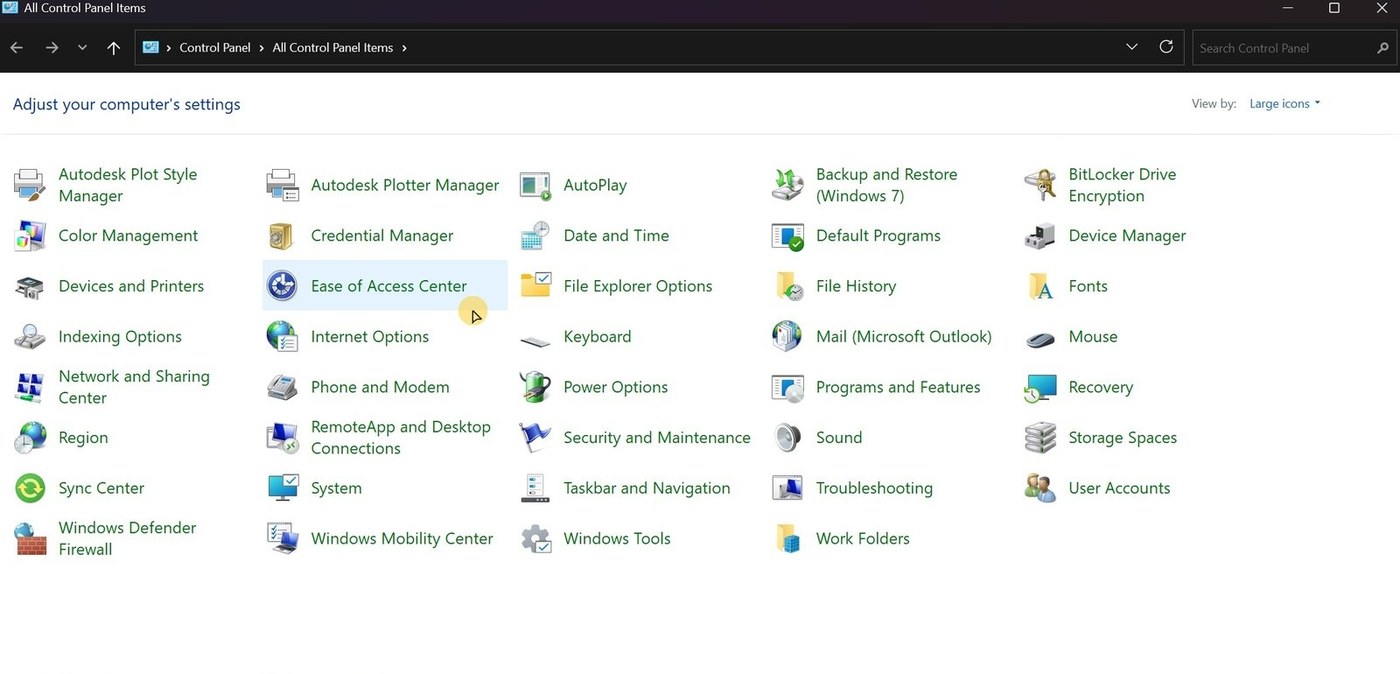
This is the part that makes people think they did it wrong. You turn dark mode on, File Explorer goes dark exactly as expected, and then you open Control Panel and it is blazing white.
Those are legacy Win32 surfaces that were never rebuilt for dark mode. Control Panel, Device Manager, the Run dialog, MMC consoles like Disk Management, and most older properties dialogs all fall into this group. Microsoft has quietly left them that way for years.
THERE IS NO SETTING FOR THIS
No option in Windows darkens those windows. Nothing you toggle, no registry value, no theme. It is not your fault and it is not a bug, it is simply unfinished work. The screenshot below was taken on a machine that had been in dark mode the entire session.
Dark mode is not Night light
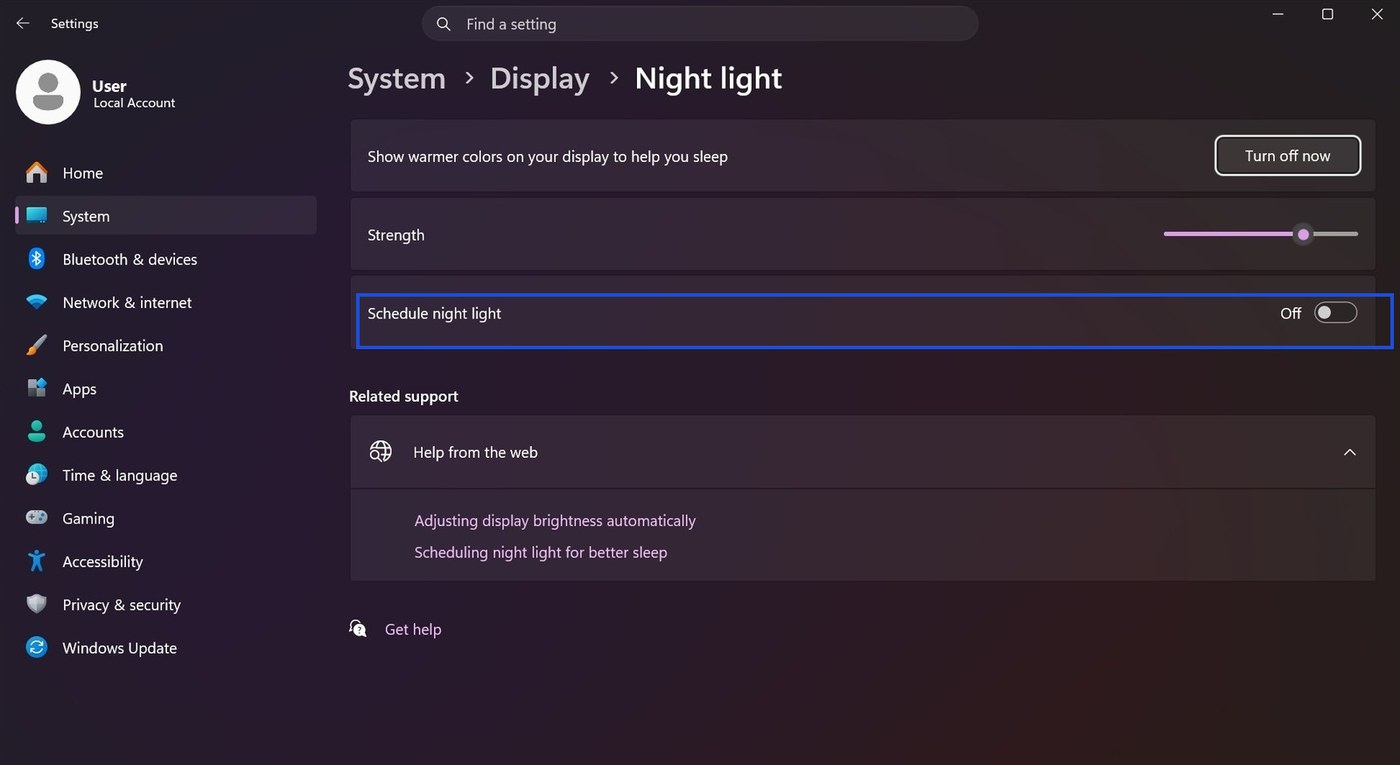
These two get confused constantly, and people end up turning on the wrong one. Night light warms the color temperature of your screen to cut blue light in the evening, so everything goes orange. Dark mode changes the colors of the interface itself. They are different settings doing different jobs, and you can happily run both.
Whether Night light does anything for your sleep is its own question, and the answer surprised us. We took it apart separately in does Night light actually help you sleep?
Night light lives at Settings › System › Display › Night light.
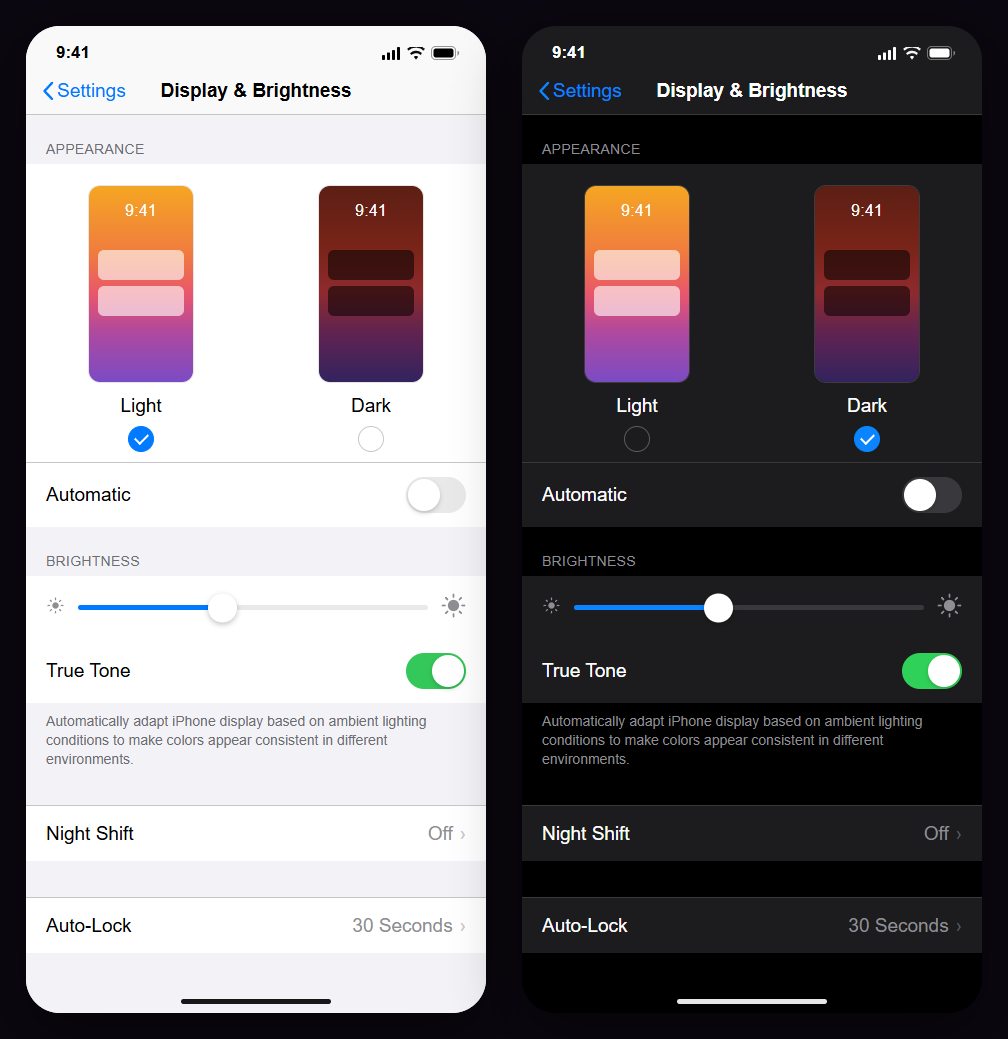
Phones draw the same line. On an iPhone, Settings › Display & Brightness puts the Light and Dark appearance switch at the top and lists Night Shift as its own row further down the same screen. Two controls, one page, doing different jobs.
Does dark mode actually help your eyes?
This is why most people go looking for the setting, so here is the honest version: there is no good evidence that dark mode reduces eye strain, and for reading, the measured evidence points the other way. There is one place it might matter for long-term eye health, and one group it clearly helps, and neither is the reason people usually give.
What actually causes digital eye strain
Not blue light. The American Academy of Ophthalmology is direct about it: no scientific evidence that light from computer screens damages the eyes, and the strain comes from how you use the screen. The main mechanism is boring and well established: you blink less when you stare at a display, roughly half as often, and your eyes dry out. The AAO also notes that long screen sessions do not permanently damage your eyes.
The two professional bodies do not fully agree
Worth knowing before anyone quotes one at you. The AAO says the small amount of blue light from screens has never been shown to harm eyes. The American Optometric Association takes a stronger line, saying blue light from LEDs and screens can negatively affect vision over the long term, and it discusses lens tints. Two professional organizations, same evidence base, different emphasis. Anyone telling you this is settled is overselling it.
For reading, light backgrounds measurably win
Vision researchers call this the positive polarity advantage: dark text on a light background beats light text on a dark one. The mechanism is your pupil. A bright background makes it constrict, a smaller pupil gives a sharper image on the retina, and sharper is easier to read.
Piepenbrock, Mayr and Buchner measured both halves of that, reporting smaller pupils and better proofreading on positive polarity displays (Ergonomics, 2014). The same group found the advantage held for both younger and older adults (Ergonomics, 2013), and that it grows as text gets smaller (Human Factors, 2014).
That last paper contains the detail that should make everyone cautious about trusting their own impression here. Participants rated more blur in dark mode, but their subjective sense of how well they could focus did not differ between modes, even though their measured performance did. In other words, people could not feel the difference the instruments picked up. Whichever mode you prefer, your preference is not evidence.
THE HONEST SUMMARY
For reading a lot of text accurately, light mode is the better documented choice. For comfort in a dark room, dark mode has a real case. Pick per situation, not per ideology.
But surely dark mode wins at night?
This is the assumption that surprised us most. Dobres, Chahine and Reimer tested legibility across ambient lighting levels and found that light mode still came out ahead at night, and the gap was widest for small type (Applied Ergonomics, 2017).
It is not unanimous. Xie and colleagues reported in IEEE Access (2021) that in low light at night, dark mode reduced objective fatigue markers such as blink rate and pupil accommodation, while people's stated preference still favored light mode. Objective and subjective measures disagreeing is a recurring theme in this literature, and it is a good reason to hold any strong claim loosely.
The one real long-term lead: myopia
This is the most interesting result in the pile and almost nobody cites it. Aleman, Wang and Schaeffel found that an hour of reading dark-on-light thinned the choroid by about 16 microns, while white-on-black thickened it by about 10 (Scientific Reports, 2018). Choroidal thickening is associated with slowing myopia progression, so the authors suggest light text on a dark background might inhibit myopia while conventional black-on-white stimulates it.
Read the size of that study before you act on it: seven participants, one hour, a proxy measurement rather than actual vision outcomes. It is a lead worth following, not a finding to reorganize your life around. It is also worth noticing that this is the opposite trade-off from the reading research: the polarity that reads worse may be the one that is kinder to a growing eye.
Who dark mode clearly helps
People with cloudy optics. Nielsen Norman Group's review of this literature notes that people with cataracts and similar conditions can read better in dark mode, because a bright background scatters inside the eye. If light mode wins for normal vision, that is exactly the population where it stops winning.
People with light sensitivity. A dark interface emits less total light, and people living with photophobia, which is common in migraine, often strongly prefer it. To be precise: that is a documented condition and a reasonable preference, not evidence that dark mode treats anything.
Where it genuinely helps everyone else
A dark room. The strongest practical case. A bright screen in an unlit room creates a harsh gap between display and surroundings, and the AAO notes that too bright a screen in a dark room may cause digital eye strain. The AOA puts the same idea as a rule: room lighting should be about the same brightness as your screen, not much brighter or dimmer.
Though if you are in that situation, the better fix may be the room. Testing dark mode at 0, 5 and 10 lux, Fan and colleagues found that simply raising the ambient light reduced visual fatigue (Sensors, 2024). Turning on a lamp beats changing a theme.
The evening, and this one needs care. Blue light does not hurt your eyes, but it genuinely does affect circadian rhythm: short-wavelength light suppresses melatonin, which is why evening screens can leave you wired. That part is real and well established, and it is the actual reason Night light exists.
What is much shakier is whether the setting fixes it. A 2021 randomized trial put 167 adults through a week of phone use in the hour before bed, split three ways: Night Shift on, Night Shift off, and no phone at all. It found no difference in sleep outcomes between the groups (Sleep Health). Among people who normally slept enough, using no phone beat using one with Night Shift on. The authors' reading is that the problem is more complicated than blue light, because a phone also keeps you mentally engaged, and that arousal does not care what color temperature the screen is.
So the honest advice is the AAO's original version: put the device down one to two hours before bed. Warming the screen is not a substitute for that. On Windows the setting that shifts color temperature is Night light, not dark mode.
There is a lot more to this one, including what a warmer screen measurably does to melatonin and why red light is genuinely different from blue. It has its own guide: does Night light actually help you sleep?
A DOCUMENTATION GAP, WHILE WE ARE HERE
The AAO's own guidance page treats "night mode, or dark mode" as a single setting. Microsoft and Apple ship them as two separate controls that do different things: Night light and Night Shift change color temperature, dark mode changes interface colors. If the eye doctors' page blurs them, no wonder everyone else does. This is the same confusion that has people turning on the wrong one.
The trial that does favor dark mode
Sengsoon and Intaruk ran tablet users through an hour in each mode and measured visual fatigue, critical flicker frequency and dry eye symptoms (IJERPH, 2025). On the fatigue questionnaire there was no significant difference between the modes (p = 0.305): scores rose from 11.47 to 18.37 in light mode and 12.40 to 18.87 in dark mode. Fatigue climbed significantly in both. The differences that did reach significance were in critical flicker frequency and dry eye.
The authors conclude dark mode may help reduce eye fatigue risk. Note that conclusion rests on the flicker and dry eye measures, not the fatigue score, which did not differ. And the sample was 30 participants, all female, average age 21, for one hour. That is a starting point, not a verdict.
While we are here: blue light glasses
People conflate dark mode with blue light filtering constantly. A 2023 Cochrane review pooled 17 trials covering 619 people and found blue-light filtering lenses probably make no difference to eye strain, visual performance or sleep quality. Cochrane reviews are about as rigorous as evidence synthesis gets. Save your money.
What the eye doctors actually recommend
None of it is a display theme. The AAO and AOA broadly agree: follow the 20-20-20 rule, every 20 minutes look at something 20 feet away for 20 seconds. Blink deliberately, and use artificial tears when your eyes feel dry. Sit about 25 inches from the screen with your gaze angled slightly downward, and take a 15 minute break after two continuous hours. Match your screen brightness to the room, and kill glare. Every one of those will do more for your eyes than any theme setting.
| Claim | What the evidence says | Source |
|---|---|---|
| Dark mode reduces eye strain | Not established. A 2025 trial found no significant difference in visual fatigue (p = 0.305) | IJERPH 2025 |
| Dark mode is better for reading | No, the reverse. Light backgrounds give smaller pupils, sharper focus, better accuracy, and the gap widens as text shrinks | Ergonomics 2013, 2014; Human Factors 2014 |
| Dark mode is better at night | Contested. Legibility research still favored light mode at night; another study found dark mode better on objective markers but not on preference | Applied Ergonomics 2017; IEEE Access 2021 |
| Dark mode may slow myopia | An early lead, not a finding. Choroid thickened after dark-mode reading, thinned after light-mode. Seven participants | Scientific Reports 2018 |
| Dark mode helps some people read better | Yes, for cataracts and other cloudy optics | NN/g literature review |
| Dark mode helps in a dark room | Yes, but raising the room light helps more | AAO; Sensors 2024 |
| Blue light damages your eyes | AAO says no. AOA is more cautious about long-term effects | AAO; AOA |
| Blue light affects sleep | Yes. Short-wavelength light suppresses melatonin | AAO |
| Night mode protects your sleep | Not shown. A randomized week-long trial found no difference between Night Shift on, off, and no phone | Sleep Health 2021 |
| Blue light glasses help eye strain | Probably no difference. 17 trials, 619 people | Cochrane 2023 |
| Dark mode saves battery | On OLED yes, on LCD essentially nothing | Panel physics |
There is no built in schedule for dark mode
Night light will turn itself on at sunset if you let it. Dark mode has no equivalent. Windows 11 ships with no way to switch modes on a timer, which is exactly why so many small apps offer to do it for you.
If you want it automated without installing anything, Task Scheduler can flip the two registry values that back these settings, both under HKCU\Software\Microsoft\Windows\CurrentVersion\Themes\Personalize: SystemUsesLightTheme for the shell and AppsUseLightTheme for apps. Zero means dark. That is genuinely what Custom mode is writing when you change those two dropdowns.
Your apps keep their own setting
Chrome, Edge, Office and plenty of others each have an appearance control of their own. Some follow Windows, some ignore it completely, and some have a third option called "System" that you have to select before they will follow anything. If one app is still white after all of this, the switch you want is inside that app, not in Windows.
Does dark mode save battery?
On an OLED screen, yes, and meaningfully so: a black pixel on OLED is a pixel that is switched off. On a standard LCD, which is most Windows laptops, the backlight is on across the whole panel no matter what color is displayed, so dark mode saves essentially nothing. Pick it because you prefer it, not because of the battery.
Three clicks, one option most people never open, and one thing dark mode is not. That is the whole picture.